Skip to content

How to Choose the Best Wireless Lock?

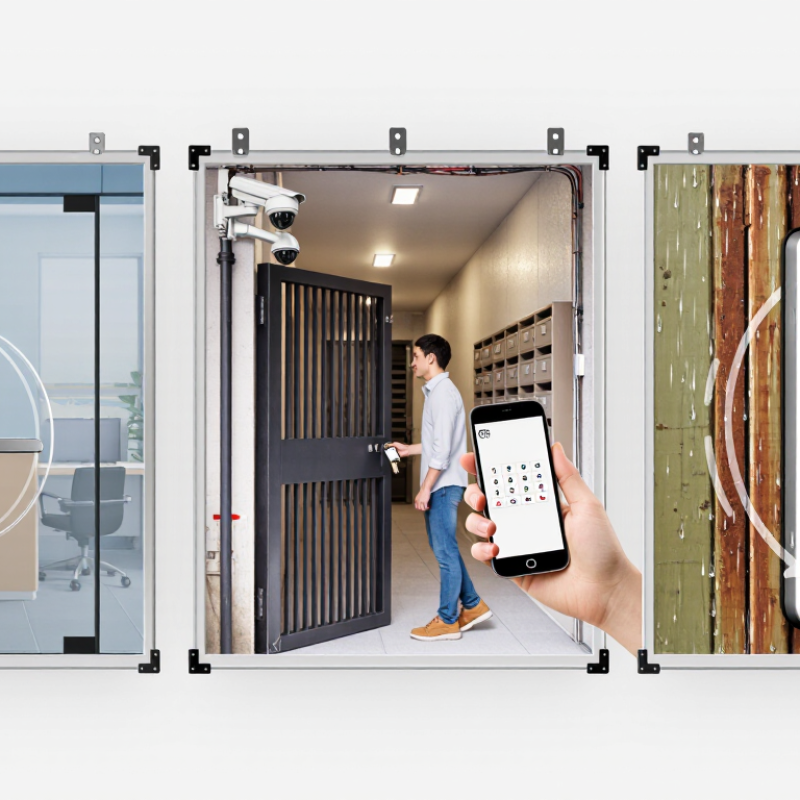
Choosing the best Wireless Lock is not simply a matter of comparing prices or downloading a phone app. A reliable decision begins with the door, the users, and the risks surrounding the property. A glass office entrance has different needs from a metal apartment gate or a weather-exposed storage room. Check battery access, emergency entry, installation strength, wireless range, and compatibility with existing access systems. Small details matter. A dead battery should not become a morning crisis.

Security technologist Bruce Schneier offers a useful principle: “Security is a process, not a product.” Although his statement applies to security broadly, it strongly fits every Wireless Lock evaluation. A lock can use strong encryption and still fail through weak passwords, poor firmware updates, or careless user permissions. Look for documented security testing, clear update policies, audit logs, and dependable customer support. Ask who can unlock the door, when access expires, and what happens if the network disappears. Experience also teaches a less comfortable lesson: the most advanced model is not always the safest choice. Complexity can create new points of failure. A practical Wireless Lock should remain secure during ordinary mistakes, not only during perfect setup. This guide compares essential features, real installation conditions, and long-term operating costs, helping readers choose with evidence rather than attractive specifications.

How to Choose the Best Wireless Lock?

What Is a Wireless Lock and How Does It Work?

A wireless lock secures a door without a wired connection to a central control system. It usually combines an electronic locking motor, battery, sensor, and wireless radio. Common connections include Bluetooth, Wi-Fi, Zigbee, and Z-Wave. A phone, keypad, card, or management platform sends an encrypted access request. The lock verifies that request, then moves the deadbolt or latch.

Its operation is simple, but the details matter. Bluetooth may support nearby access with lower battery use. Wi-Fi enables remote control, but it can consume more power. A gateway can connect several locks to cloud software and create time-stamped entry records. MarketsandMarkets estimates that the global smart lock market may reach USD 4.4 billion by 2027, showing stronger demand for connected access. However, market growth does not guarantee security. NIST guidance recommends strong authentication, protected communications, and careful key management. Battery failure remains an ordinary weakness. I have seen installations work well until maintenance schedules were ignored.

Tips: Check battery-life claims in real buildings, not only laboratories. Select encrypted communication and emergency power options. Keep mechanical keys protected and limit administrator permissions. Review access logs regularly. The 2024 Verizon Data Breach Investigations Report found that the human element remained involved in 68% of breaches, so user training still matters. A wireless lock is only as reliable as its setup, updates, and daily supervision.

Which Wireless Lock Features Match Your Security Needs?

How to Choose the Best Wireless Lock?

The right wireless lock depends on the risks inside your property. A home office may need simple user codes and mobile alerts. A storage room may require temporary access and detailed entry records. Match each feature to a real security concern, not a long specification sheet.

During site checks, I look for access control before convenience. Individual credentials show who opened the door and when. Temporary permissions help contractors enter during defined hours. Automatic locking reduces forgotten doors, but timing must fit daily routines. A short delay can frustrate staff. A long delay can create exposure. Test it first.

Strong encryption protects communication between the lock, app, and connected devices. Two-factor authentication adds another barrier to unauthorized access. Choose a model with low-battery warnings and a reliable emergency power option. Wireless signals can fail through thick walls or during network outages. Offline operation matters. A mechanical override may still be valuable. Check the door material, weather exposure, and installation quality before buying. An impressive lock can perform poorly on a misaligned door. I have seen convenience features distract from basic maintenance, especially battery replacement and permission reviews. Schedule both. Also confirm how access data is stored and deleted. Clear privacy controls support trustworthy security decisions.

How to Choose the Best Wireless Lock?

Which Wireless Lock Features Match Your Security Needs?

The chart compares key wireless lock features by their practical importance for common security needs. Higher scores indicate a stronger match. Encryption and access logs support accountability, while remote access and battery alerts improve convenience and operational reliability. Emergency power access can help maintain entry during battery or power-related issues.

How to Compare Wireless Lock Types and Access Methods

How to Choose the Best Wireless Lock?

Wireless lock selection starts with comparing the connection, not the appearance.Bluetooth Locks suit nearby access and usually conserve battery power. Wi-Fi models support remote control, but they need stronger network security and frequent power checks. Zigbee or Z-Wave locks can connect with smart-home hubs and reduce direct internet exposure. Cellular models offer wider coverage, though installation and subscription costs may increase.

Grand View Research reported that the global smart lock market was valued at approximately USD 2.81 billion in 2023. Its 2024 analysis also projects strong growth through 2030. That growth reflects wider adoption, not automatic reliability. Compare battery alerts, offline operation, connection range, and event records before choosing a lock. A lock beside a metal entrance door may perform differently from one installed inside a dry office corridor.

Access methods require equal attention.

Mobile apps provide remote permissions and audit trails. PIN codes work well for shared doors and temporary visitors. RFID or NFC credentials offer fast entry, while biometric readers can improve convenience but may struggle with wet fingers or poor lighting.

According to MarketsandMarkets’ 2024 smart locks report, rising demand is linked to connected access and identity management. Still, reports cannot predict every real installation.

I would test the lock with gloves, a dead phone, and a weak signal. Keep a lawful mechanical override. Small failures matter.

What Installation and Compatibility Factors Should You Check?

Choosing a wireless lock starts with the door, not the app. Measure door thickness, backset, and borehole diameter before ordering. Check whether the door uses a deadbolt, mortise case, or multipoint mechanism. These parts are not interchangeable. I once assumed a standard deadbolt would fit an older apartment door. It did not. That small mistake left the strike plate misaligned and the latch unable to extend smoothly. A paper template and a steel tape measure are more reliable than a product photo.

Review installation requirements carefully. Some locks need a flat interior surface, while others require clearance around the thumb turn. Confirm hinge direction, frame depth, and strike alignment. The lock should turn by hand before you tighten every screw. Test it with the door open. Then test it closed. Never force the motor. Excess resistance may indicate warped timber, loose hinges, or poor alignment. An experienced installer can identify these issues before they damage the mechanism.

Check power and connectivity too. Confirm battery type, expected battery life, and whether low-power alerts work without an active internet connection. Bluetooth may work nearby, while remote control can require Wi-Fi or a separate hub. Verify phone operating-system support and shared-access limits. For outdoor or damp locations, inspect the stated weather-resistance rating. Also check fire-door requirements, local building rules, and emergency-entry procedures. Compatibility includes how the household will use the lock during a flat battery or network outage. I still prefer a physical backup method, even when wireless features seem dependable.

How to Evaluate Reliability, Privacy, and Long-Term Costs?

How to Choose the Best Wireless Lock?

Reliability starts with the boring details: battery life, signal strength, and mechanical backup. Test the lock beside a concrete wall, not only near the router. Check independent durability testing and the maker’s firmware-support period. NISTIR 8259A recommends secure updates, unique device identity, and protected data for IoT products. A lock without update support may become expensive security hardware.

Privacy deserves equal attention. Ask where access logs are stored, who can view them, and how long they remain available. The 2024 Verizon Data Breach Investigations Report found that human involvement appeared in 68% of breaches. Shared codes and reused passwords remain practical weaknesses. Use multi-factor authentication when available. Local control is often preferable, but I would not assume it is automatically safer. Poorly configured local systems can still expose data.

Calculate the five-year cost. Include batteries, hubs, cellular backup, paid features, replacement parts, and a locksmith visit after a failed motor. A low purchase price can hide recurring fees. Keep one physical key or emergency power method outside the main access routine. It sounds old-fashioned. That is the point. Before buying, record battery changes, failed unlocks, and app outages for several months. Real household experience may contradict the advertised battery estimate. Review the privacy policy annually, because “free” access history may be paid for with personal data.

How to Choose the Best Wireless Lock? - How to Evaluate Reliability, Privacy, and Long-Term Costs?

Wireless Lock Category Typical Connectivity Typical Purchase Cost Reliability and Availability Privacy Characteristics Remote Access Battery Expectations Long-Term Cost Factors Best Use Case
Bluetooth Retrofit Lock Bluetooth Low Energy; usually connects directly to a nearby phone or optional bridge Approximately $80–$180 High for local use
Operates without home Wi-Fi when the user is nearby. Remote operation normally requires an additional bridge.
Generally strong
Local Bluetooth control can reduce cloud dependence, but app permissions, account security, and phone storage still matter.
Usually limited without an optional internet bridge Typically several months to about one year, depending on lock activity, temperature, and battery type Possible bridge purchase, batteries, app or cloud subscription if remote features are added Renters and homeowners who want to keep the existing exterior hardware and mainly use local phone access
Wi-Fi-Connected Smart Lock Direct Wi-Fi connection or Wi-Fi through an included adapter Approximately $150–$350 Medium to high
Remote access depends on wireless coverage, internet service, server availability, and firmware support.
Moderate
Internet-connected operation may involve account data, access logs, device identifiers, and cloud processing.
Usually available from anywhere with an internet connection Often shorter than Bluetooth-only models because Wi-Fi uses more power; commonly several weeks to several months Higher battery replacement frequency, possible cloud subscription, and potential replacement cost if software support ends Homes that need convenient remote unlocking, delivery access, or activity notifications without a separate hub
Hub-Based Zigbee or Z-Wave Lock Zigbee or Z-Wave to a compatible local hub; the hub may use Ethernet or Wi-Fi Approximately $150–$350 for the lock; hub may cost an additional $50–$200 High when correctly configured
Mesh networking can improve range and resilience, while local hub control may continue during an internet outage.
Potentially strong
Local processing is possible, but privacy depends on the hub, mobile app, integrations, and optional cloud services.
Available when the hub is connected to the internet; local control can remain available during some outages Commonly several months to more than one year, depending on radio protocol, usage, and battery chemistry Hub purchase, maintenance, batteries, integration costs, and possible subscription fees Smart homes that already use a compatible hub and require automation, local control, or multi-device integration
Keypad Lock with Optional Wireless Features PIN keypad with Bluetooth, Wi-Fi, or a separate gateway depending on the model Approximately $100–$300 High for basic entry
PIN access can continue even when a phone is unavailable; electronic operation still requires battery power.
Moderate to strong
It can avoid sharing physical keys, but PINs, event histories, and user accounts should be managed securely.
Optional; depends on wireless hardware or a gateway Commonly several months to about one year; frequent motor operation can reduce battery life Batteries, optional gateway, replacement keypads, and possible software or monitoring fees Families, short-term access, service personnel, and users who want phone-free entry
Commercial Wireless Access-Control Lock Encrypted wireless protocol, controller, access gateway, or enterprise network Approximately $300–$1,000+ per door before installation High when professionally installed
Designed for audit trails, managed credentials, maintenance procedures, and higher usage levels.
Policy-dependent
Centralized logs improve accountability but create more sensitive access data that must be retained and protected.
Usually available through an access-management platform Often several months to multiple years, depending on reader type, lock design, traffic, and power configuration Installation, controller or gateway hardware, credential management, service contracts, batteries, and software licensing Offices, rental properties, healthcare facilities, and buildings requiring user-level permissions and audit records
Standalone Electronic Lock with No Network PIN, RFID credential, or local programming; no internet connection Approximately $80–$250 High for simple access
It avoids internet outages and cloud-service interruptions, but lost credentials and local hardware failures require manual handling.
Strong by design
No routine cloud transmission or remote account is required, although local event storage may exist.
Not available Typically several months to more than one year, depending on usage and lock mechanism Batteries, manual credential management, and possible service visits; usually no recurring cloud fee Low-connectivity locations, privacy-focused users, storage areas, and doors that do not need remote management

Evaluation notes: Cost and battery figures are typical market ranges rather than guaranteed specifications. Actual performance varies with door alignment, temperature, traffic, battery quality, wireless signal strength, firmware support, and installation quality.

Reliability checklist: Look for manual key or mechanical override options, low-battery warnings, offline access behavior, clear firmware-support policies, and documented failure-recovery procedures.

Privacy checklist: Prefer strong encryption, unique passwords, multi-factor authentication, minimal data collection, local-control options, transparent retention policies, and the ability to delete access history.

Article Source: